
How to Find Backlinks Using Google Search (Free Methods That Work in 2026)
If you want more backlinks without paying for expensive SEO tools, Google itself can be your secret weapon. With the right search operators and queries, you can use Google to find backlink opportunities that your competitors are already tapping into.
Why This Matters
Backlinks remain one of the strongest signals Google uses to rank websites. But most people overlook the simplest resource they already have at their fingertips — Google Search. That’s why learning how to use Google to find backlink opportunities can save you time and money.
Who This Guide Is For
Whether you’re a solopreneur bootstrapping your site’s SEO, a content marketer tired of expensive tools, or an agency looking to scale backlink research without ballooning costs, this guide gives you a repeatable system using only Google Search.
What You Will Learn
In this guide, you’ll discover:
- How to use Google search operators to reveal backlink prospects
- Ways to analyze competitor backlinks using free searches
- Techniques to spot relevant websites that are open to linking
- How to reach out to them
By the end, you’ll know how to turn a free tool you use daily into a powerful backlink research engine.
Step 1: How to Use Google to Find Backlink Opportunities (with Search Operators)
Google is more than a search engine; it’s a data goldmine. With advanced search operators, you can laser-target websites open to backlinks. Here’s how:
1.1 Competitor Backlink Analysis Using Google
Find who’s linking to your competitors but not to you.
Query:
“Ahrefs” -inurl:ahrefs.com
This shows sites mentioning Ahrefs but excluding their own domain. Swap in your competitor’s brand name to find link prospects.
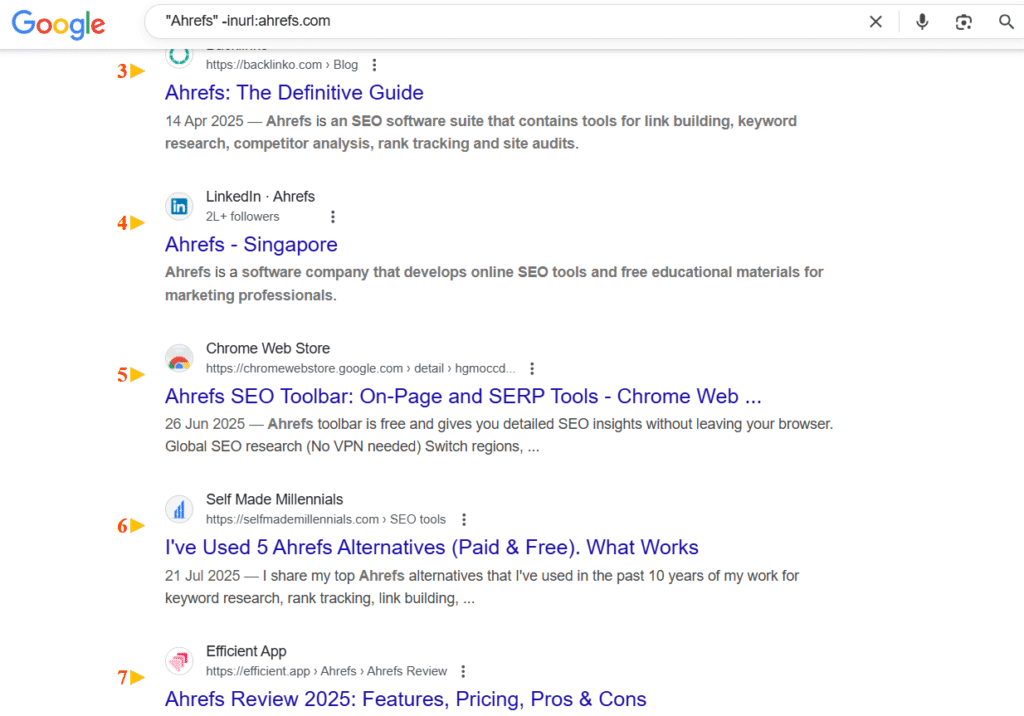
"Ahrefs" → Google will show results that mention the word Ahrefs anywhere on the page.
-inurl:ahrefs.com → The minus sign ( – ) tells Google to exclude results from any page that has ahrefs.com in the URL.
Basically, it’s a way to find what other sites are saying about Ahrefs (like reviews, tutorials, comparisons, or mentions) without getting their own blog or docs.
Perfect – here’s how SEOs actually use the query:
Practical Uses of this Google search query
"exampledomain" -inurl:exampledomain.com

- Find Brand Mentions (Unlinked): See where people mention your brand without linking—perfect for turning mentions into backlinks.
- Competitor Research: Swap in a competitor’s name to find who’s writing about them—great targets for your own outreach or guest posts.
- Reviews & Comparisons: Look for “X vs Y” or “Best [niche] tools” articles. Pitch to get included as an alternative or in lists.
- Content Ideas: Observe which topics attract attention and create similar or better content.
Bottom line: This operator filters out the brand’s own site and reveals all third-party buzz—a powerful backlink prospecting tool.
1.2. Find Guest Post Opportunities Using Google Search Operators

Guest posting is still alive (if you do it right). One of the easiest ways is to use Google to find backlink opportunities on sites openly accepting guest posts.
Query:
inurl:(“write for us” | “guest post” | “contribute”) “digital marketing”
This pulls up sites in your niche actively accepting contributions.
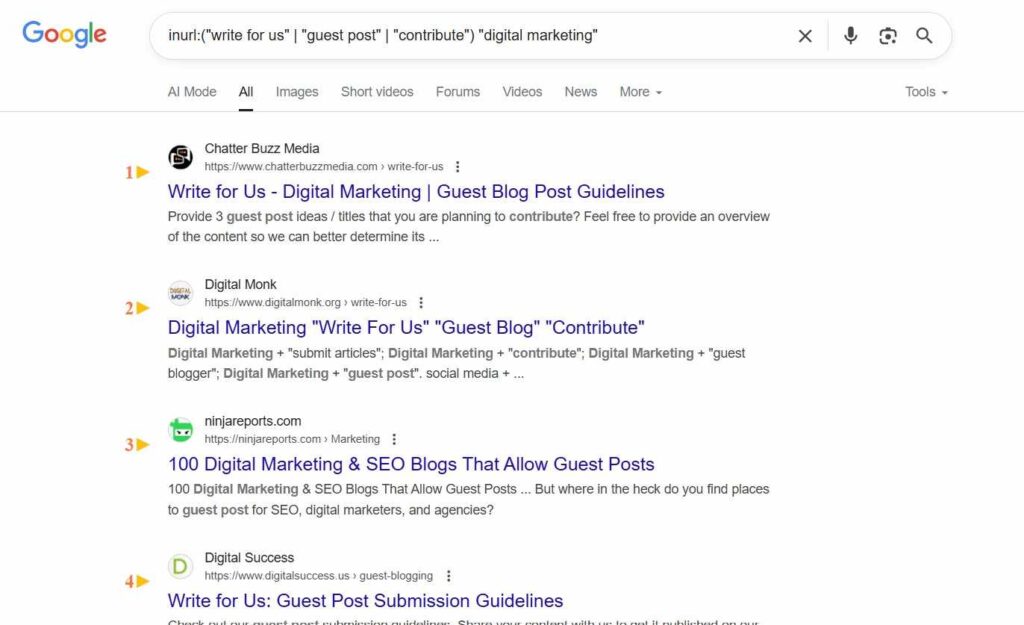
inurl: tells Google to only show pages that have certain words in their URL (website link).
("write for us" | "guest post" | "contribute") means we’re asking Google to look for any of these phrases:
- “write for us”
- “guest post”
- “contribute”
"digital marketing" means the page also has to mention digital marketing.
So when you put it all together:
Google will show you websites about digital marketing that have a page in their URL like /write-for-us/, /guest-post/, or /contribute/ — basically sites that are openly accepting guest posts in that niche.
Practical Use Cases of this query
inurl:(“write for us” | “guest post” | “contribute”) “digital marketing”
- Find Guest Posting Sites: Pull up blogs and sites that accept guest contributions—perfect for pitching articles with backlinks.
- Backlink Prospecting: These sites already link out to contributors, so your chances of a contextual backlink are higher.
- Niche-Relevant Outreach: Filtering by your niche ensures links are relevant, boosting SEO value.
- Authority & Exposure: Publishing here earns backlinks and positions you as an expert.
- Competitor Analysis: Swap in competitors’ niches to see where they’ve guest posted—chances are you’ll get accepted too.
- Content Partnerships: Many “write for us” sites offer long-term collaboration opportunities.
In Short: This query gives a ready-made list of niche blogs actively accepting guest posts.
1.3. Find Resource Pages Using Google Search Operators

These are curated lists of helpful links—perfect for pitching your content.
Query:
“SEO” inurl:(resources | links | useful-links)
If you’ve got a guide or tool worth sharing, these pages are prime backlink territory.
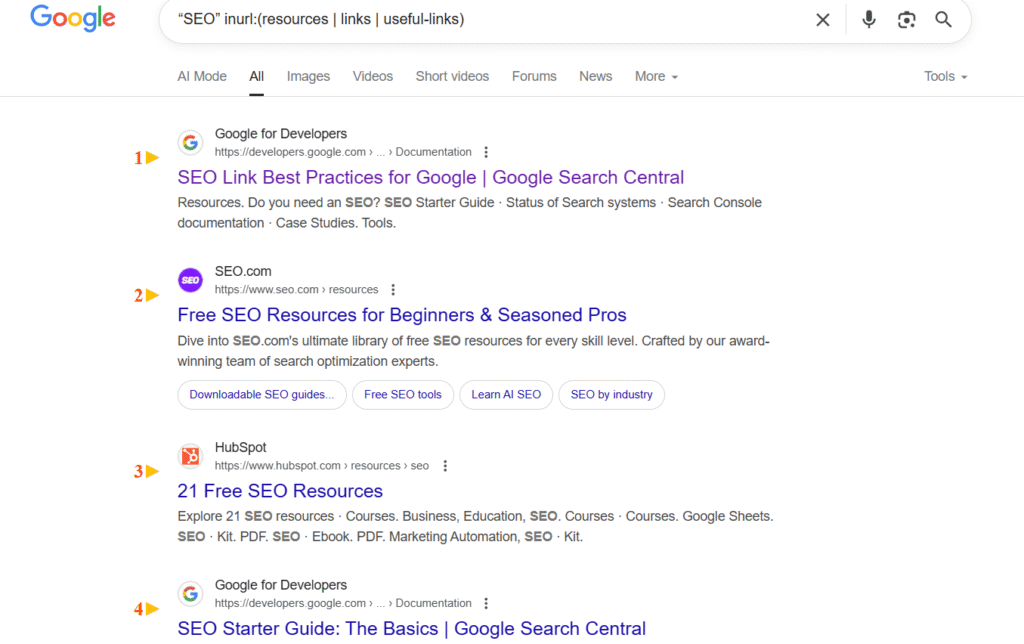
"SEO" → Google will only show pages that mention SEO.
inurl:(resources | links | useful-links) → This means Google will look for pages that have resources, links, or useful-links in their URL.
Example: website.com/resources, website.com/links, or website.com/useful-links.
Put together:
This search finds websites that have a resources/links page about SEO.
Why it’s useful for SEO/backlinks:
These pages list tools, guides, and websites. Reach out to get your site or content added—easy backlinks. Great for link roundups or curated lists. Think of it as Googling for sites with “resources” or “links” pages in your niche.
1.4. Find Broken Link Opportunities Using Google Search Operators
Dead links on resource pages are goldmines for backlinks—you help site owners fix their pages while earning a contextual link to your content. This is another smart way to use Google to find backlink opportunities that most people miss.
The Smart Approach: Find Resource Pages First, Then Check for Broken Links
Instead of searching for “404 error” (which surfaces error page templates, not actual broken links), use this two-step method:
Step 1: Find Resource Pages in Your Niche
Query:
“web design” inurl:resources
“web design” intitle:”useful resources”
“web design” “recommended sites”
These searches pull up curated link lists and resource pages where site owners have already done the work of compiling helpful links.
Step 2: Scan Those Pages for Dead Links
Use a broken link checker on the pages you found:
- Free tools: Check My Links (Chrome extension), Dead Link Checker
- Paid tools: Ahrefs Site Explorer, Screaming Frog
You’ll often find outdated links the site owner hasn’t noticed yet.
Bonus Variations to Find Dead Resources
These queries surface pages where resources have likely gone stale:
“web design” inurl:resources “no longer available”
“web design” inurl:resources “moved permanently”
“web design” inurl:resources “last updated 2024”
Turn Broken Links Into Backlinks, reach out to the site owners by using the email template that we will share later in this article.
1.5. Find Niche Blogs and Forums for Backlinks with Google Operators
Not the spammy kind—legit forums and blogs where your expertise adds to the discussion.
Query:
inurl:(forum | discussions | blog) “personal finance”
Contribute meaningfully, and you can secure backlinks that feel natural.
Step 2: Analyze Results Before Reaching Out
Not every site is worth chasing. Use these filters:
- Authority: Check if the site has good domain authority and reputation.
- Relevance: Does the site align with your niche? A finance site backlinking to a pet blog makes no sense.
- Activity: Look for recent posts, engaged comments, and social shares.
- Contactability: If you can’t find an email or contact page, skip it.
Pro tip: Use a quick spreadsheet to log site metrics and outreach status. (We have created a free one, you can access it here)
Step 3: Refine with Search Modifiers
Make your searches even sharper with these tricks:
- Exact Phrases: “digital marketing tools”
- Exclude Pages: -inurl:(signup | login)
- Target Domains: site:*.edu “guest post”
Modifiers cut through noise and help you zero in on link-worthy sites.
Step 4: Use Related Searches
Scroll to the bottom of any Google results page, and you’ll see “Searches related to…” suggestions. These are basically free keyword expansions that can spark new queries for backlink hunting.
Example: Searching “SEO tools” might show “best SEO tools 2025“—opening up fresh opportunities.
Step 5: Set Up Google Alerts
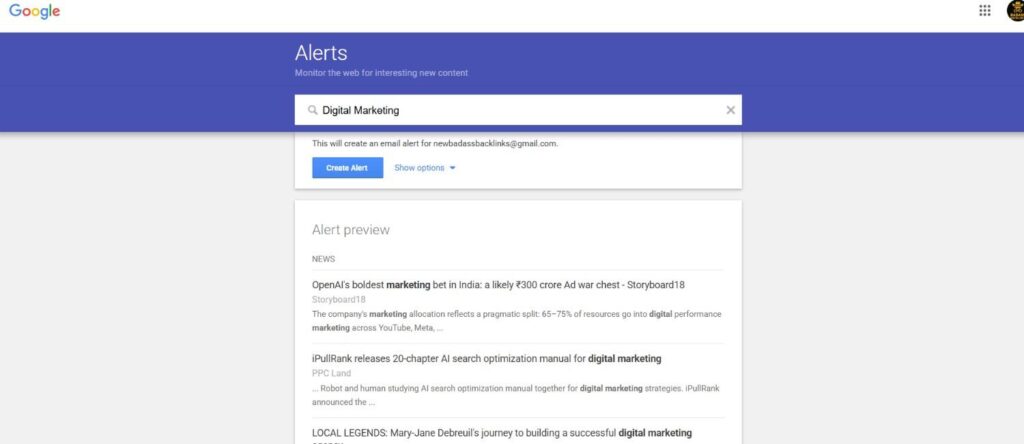
Instead of searching daily, let Google bring backlink opportunities to you.
Set up alerts for:
- Your niche keywords (e.g., “digital marketing”)
- Competitor brand names
- Terms like “guest post” or “write for us“
You’ll get an email every time new content pops up—fresh chances for outreach.
Step 6: Focus on Quality, Not Quantity
A single backlink from a high-authority, relevant site beats 20 from random blogs. Prioritize:
- Reputable sites over link farms.
- Active sites with fresh content.
- Niche relevance to your target audience.
Avoid paid links—they might look tempting but can land you in Google’s penalty box.
Step 7: Turn Prospects Into Backlinks with Smart Outreach
Finding opportunities is only half the battle. To convert prospects into live backlinks, your outreach needs to be personal, valuable, and concise.

Sample Email #1: Guest Post Pitch
Subject: Guest post idea for [Website Name]: [Specific Topic]Hi [Recipient’s Name],
I came across your article on [specific topic] and appreciated how you [specific detail they covered]. Your angle on [something unique] was especially useful.
I write about [your niche] over at [Your Site] and have an idea that might fit your audience: “[Proposed Headline]”
It would cover [brief outline: 2-3 points], with original research/examples from [your unique angle].
Would you be open to a pitch or draft? Happy to follow any guest post guidelines you have.
Thanks for considering it!
Best,
[Your Full Name]
[Your Website URL]
Sample Email #2: Broken Link Outreach
Subject: Broken link on your [Page Title]
Hi [Recipient’s Name],
I was browsing your [specific page] and noticed a link to [dead resource] isn’t working anymore.
I actually have a [guide/tool] on [same topic] that might work as a replacement: [your URL]
It covers [specific value: what makes yours helpful], so it could fill that gap for your readers.
Either way, thought you’d want to catch that broken link. Let me know if you’d like me to suggest any other fixes I noticed!
Best,
[Your Full Name]
[Your Website URL]
Sample Email #3: Resource Page Addition
Subject: Resource Suggestion for [Page Title]
Hi [Recipient’s Name],
I found your [specific resource page] while researching [topic]—great collection of tools/guides!
I thought my [tool/guide] on [topic] might be worth adding: [your URL]
It [specific value: what makes it unique], and I think it complements resources like [mention 1-2 others they listed].
No worries if it’s not a fit—just wanted to share in case it’s helpful for your audience.
Cheers,
[Your Full Name]
[Your Website URL]
Follow-Up Template (Send 5-7 Days Later)
Subject: Re: [Original Subject]
Hi [Recipient’s Name],
Just wanted to bump this up in case it got buried. Totally understand if you’re swamped—let me know if there’s a better time to follow up or if this isn’t a fit.
Thanks,
[Your Full Name]
[Your Website URL]
Step 8: Scale Your Backlink Prospecting System
Once you’ve mastered the basics, here’s how to level up:
A) Combine Google with SEO Tools for Deeper Insights
Google finds prospects; tools like Ahrefs, SEMrush, or Moz verify their authority. ( Click to explore a list of free and paid SEO Tools).
Use Google for free discovery, then spot-check Domain Rating (DR) or Domain Authority (DA) before reaching out. Aim for DR/DA 30+ for best results. This ensures you’re targeting sites with enough authority to meaningfully impact your SEO.
B) Build a Prospecting Spreadsheet
Track everything in one place: This prevents duplicate outreach and helps you measure conversion rates over time.
- Website URL
- Contact email
- Outreach date
- Follow-up date
- Status (pending, accepted, rejected)
Try our Free Backlink Outreach Monitoring Tool to track and manage your outreach effortlessly — no cost, no catch.
C) Make Prospecting a Weekly Habit
Set aside 1-2 hours every week to run new searches and send 5-10 outreach emails. Consistency beats intensity—regular prospecting compounds over months.
D) Focus on Relationships, Not Just Links
The best backlinks come from genuine connections. Engage with site owners on social media, comment on their posts, share their content. When you finally pitch, you’re not a stranger—you’re someone they recognize.
E) Repurpose Rejected Pitches
If a guest post gets turned down, don’t scrap it. Pitch it to 3-5 other sites on your list. Same content, multiple opportunities.
Wrap-Up: Your Free Backlink Research System
You now have a complete system for finding backlinks using nothing but Google and smart search operators.
Here’s your action plan:
- Start with competitor backlink searches to find who’s linking to rivals
- Use guest post and resource page operators to discover open opportunities
- Run broken link checks on niche resource pages for easy wins
- Set up Google Alerts so opportunities come to you automatically
- Track prospects in a spreadsheet and send 5-10 personalized emails weekly
So next time you wonder “how to find backlinks in Google search,” remember: Google gives you a starting point, but real growth comes from consistent outreach and pro-level backlink strategies.
FAQs on Finding Backlinks in Google
How to find backlinks in Google search?
Use advanced operators like: "brandname" -site:yourdomain.com. This helps you spot external mentions of your site. Combine it with Google Search Console’s Links report for verified backlinks.
How to check backlinks in Google search?
Google search alone won’t give you a complete backlink list. The best free option is inside Google Search Console → Links → Top linking sites, where you’ll see domains pointing to you, top linked pages, and anchor text.
How to find backlinks of a website in Google?
You can run a query like: "competitordomain.com" -site:competitordomain.com. This reveals some mentions and backlinks in Google, but for full coverage, tools like Ahrefs or SEMrush are more accurate.
How to get a backlink in Google?
Google doesn’t directly give backlinks. You earn them through outreach — guest posts, fixing broken links, or pitching your content for resource pages. Google simply helps you discover opportunities.
How to find backlink opportunities in Google?
Use “footprint” searches like:
"write for us" + your keyword
"resources" + your topic
These uncover websites open to contributions or linking opportunities.
Pro Tip: Finding backlinks in Google works, but it takes time. Want the right opportunities without hours of searching? Badass Backlinks does the heavy lifting for you.
Get Backlinks Built to Rank Your Site
Manual outreach. SEO-focused placements.